Install BepInEx 6
BepInEx is the mod loader. Nothing else in this pack does anything until it's in place. This is the IL2CPP, x64 build — the exact flavour No Man's Home needs — and it installs by extracting one archive into your game folder and launching the game once.
BepInEx 6 IL2CPP is correct for No Man's Home because it is a Unity IL2CPP game launched by NoMansHome.exe. Do not put any of this into No Man's Sky — that is a different game with a different engine and folder layout, and these files will not work there. Throughout this guide, the only executable you should be looking at is NoMansHome.exe.
Three quick prerequisites
Two minutes of setup now prevents the most common install mistakes.
An archive tool
The download is a .rar. You need 7-Zip, WinRAR or NanaZip to extract it. Windows' built-in unzip does not open .rar files.
Visible file extensions
In File Explorer, turn on View → File name extensions. You want to see .dll, .ini and .exe clearly so you copy the right files.
The game, installed
A working copy of No Man's Home. Run it once unmodded first so you know it launches cleanly on its own.
Drop BepInEx into the game
Five steps. The only one that takes real time is the very first launch, where the loader builds its IL2CPP support files.
-
Open the game's install folder
You need the folder that directly contains
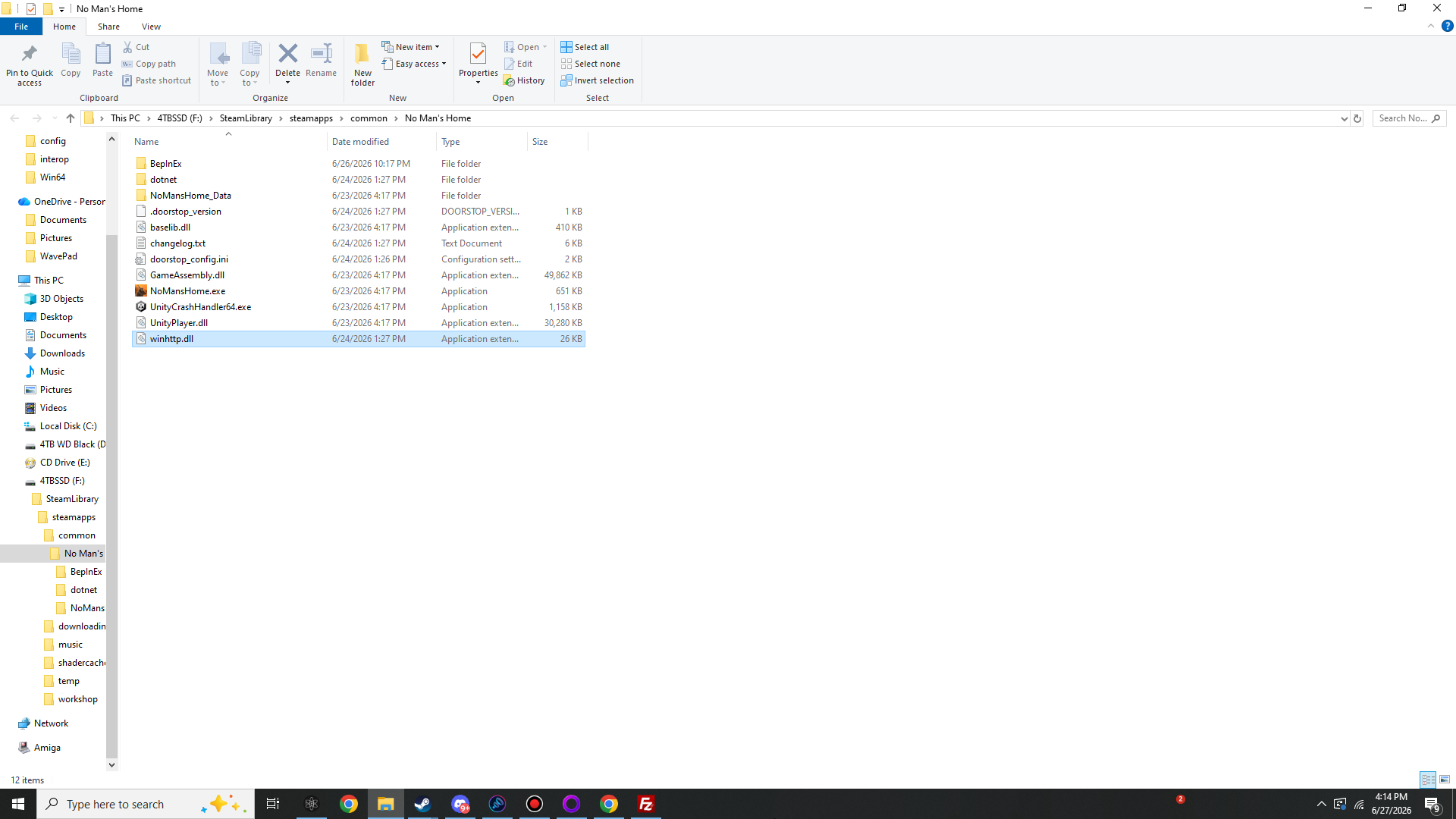
NoMansHome.exe. On Steam: right-click No Man's Home in your library → Manage → Browse local files. The folder that opens is your install root.📁 F:\SteamLibrary\steamapps\common\No Man's Home\ # your drive letter / path may differ — what matters is that # NoMansHome.exe sits right here inside it
-
Extract the BepInEx archive
Right-click
BepInEx-Unity_IL2CPP-win-x64-6_0_0-be_784.rar→ Extract here (or open it and drag the contents out). Inside you'll find aBepInExfolder, adotnetfolder,winhttp.dll,doorstop_config.iniand a couple of small files — not a single wrapper folder.Extract the contents, not the boxIf extracting makes a folder named like the archive, open it — you want the
BepInEx+dotnet+winhttp.dllitems themselves, so they can sit next toNoMansHome.exe. -
Copy everything into the game root
Select those extracted items and copy them into the game folder from step 1, right alongside
NoMansHome.exe. When Windows asks about merging theBepInEx/dotnetfolders, allow it. When done, your game folder looks exactly like this:▸ No Man's Home # your game folder (holds NoMansHome.exe)├── ▸ BepInExadded # the loader + where your plugins go├── ▸ dotnetadded # .NET runtime the IL2CPP loader needs├── ▸ NoMansHome_Data # game's own data — never touch├── winhttp.dlladded # the injector that boots BepInEx├── doorstop_config.iniadded # loader settings (leave at default)├── .doorstop_versionadded├── changelog.txtadded # BepInEx changelog├── NoMansHome.exe # ← launch THIS (this is NOT No Man's Sky)├── GameAssembly.dll # the IL2CPP game code├── UnityPlayer.dll├── baselib.dll├── UnityCrashHandler64.exegreen = added by BepInEx · dim = the game's own files (leave them all in place).
-
Leave the loader config alone
The two pieces that make BepInEx start are
winhttp.dll(Windows loads it automatically when the game starts) anddoorstop_config.ini(it points the loader at the IL2CPP core). The defaults are already correct for No Man's Home — you do not need to edit anything here.[General] enabled = true target_assembly = BepInEx\core\BepInEx.Unity.IL2CPP.dll [Il2Cpp] coreclr_path = dotnet\coreclr.dll corlib_dir = dotnet
-
Launch once — and be patient
Start No Man's Home normally (Steam Play, or run
NoMansHome.exe). The first launch is noticeably slower than usual: BepInEx is scanning the IL2CPP game and generating the proxy assemblies every plugin loads against. This is one-time work — later launches are back to normal speed. A black screen or a long pause here is expected; let it finish.# BepInEx\LogOutput.log — first launch (abridged) [Message: BepInEx] BepInEx 6.0.0-be.784 — NoMansHome.exe [Info : BepInEx] Running under Unity 2022.3.62f2 (IL2CPP, x64) [Info : BepInEx] Il2CppInterop 1.5.3 — generating proxy assemblies… [Warning:Il2CppInterop] First-time generation can take a while — this is normal [Info : BepInEx] Interop assemblies written to BepInEx\interop [Message: BepInEx] Chainloader started [Info : BepInEx] 0 plugins to load // 9 once you add the DLLs [Message: BepInEx] Chainloader startup complete
Once you reach the main menu, fully quit the game. BepInEx is now installed and you're ready to add the mods.
Confirm the loader took
After that first launch, two things prove BepInEx is live: your game folder gained a BepInEx folder, and that folder filled out with generated subfolders and logs.
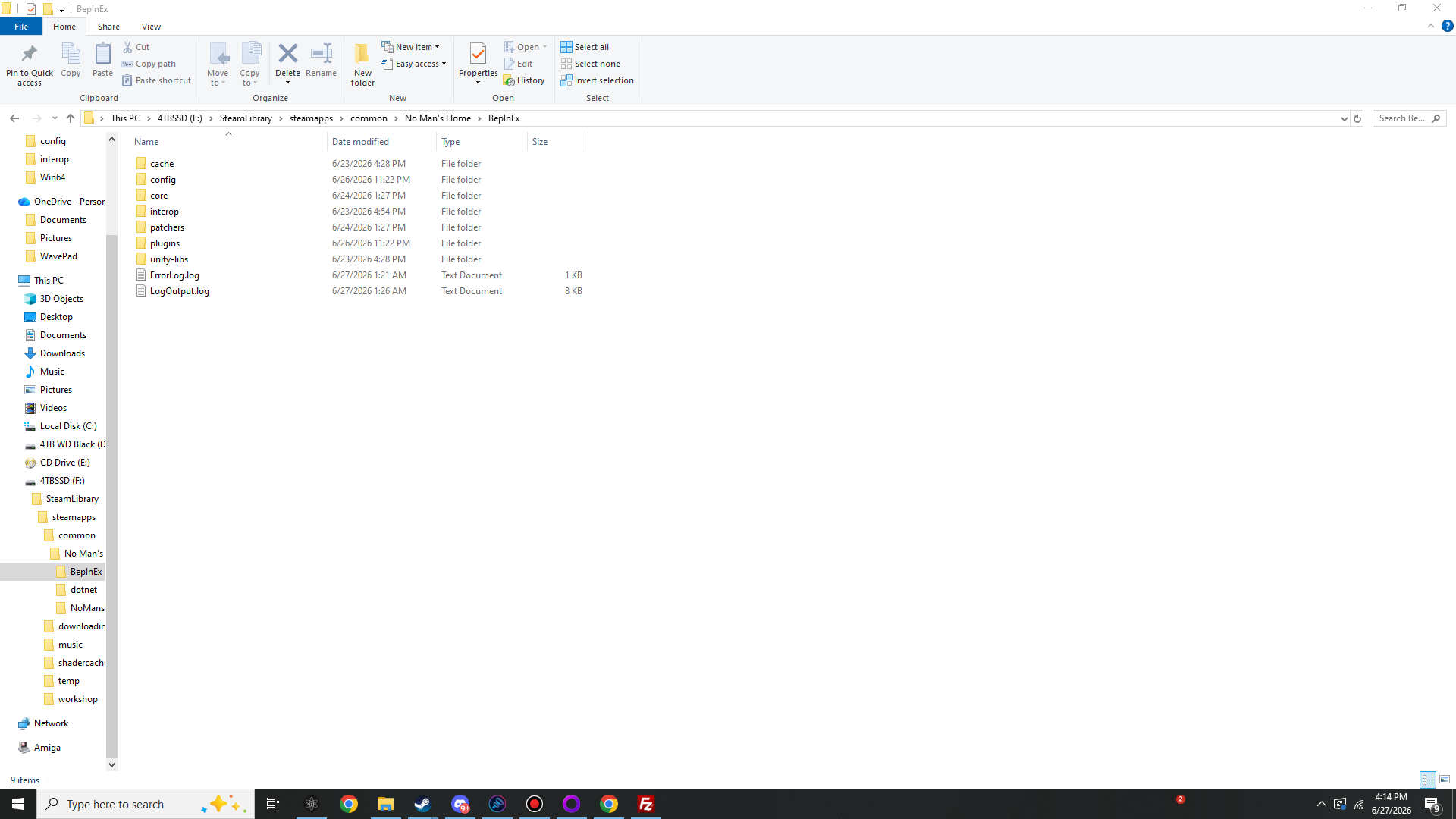
What the BepInEx folder should contain
If you see a BepInEx\interop folder and a LogOutput.log that ends with Chainloader startup complete, the foundation is solid. Move on to the loadout.
Then the loader didn't inject. Almost always this is because the files landed one folder too deep (a wrapper folder) instead of beside NoMansHome.exe, or because you launched the wrong game. Re-check step 3, confirm winhttp.dll sits next to NoMansHome.exe, and see the Diagnostics page.