Load The Nine
With BepInEx in place, the mods install the same easy way: each one is a single .dll that you drop into BepInEx\plugins\. Do them all in one go, launch once, and the wasteland is transformed. Every mod below has its own page with exact steps and a load-check.
These DLLs are BepInEx plugins — they need the loader already installed and run once. If you haven't done that yet, start on the Foundation page, then come back here. As always: the target is No Man's Home (NoMansHome.exe), not No Man's Sky.
How every mod installs
This same four-step procedure works for all nine. Each mod's own page repeats it with that mod's exact filename and verification line.
-
Extract the mod's archive
Each mod downloads as its own
.rar. Extract it and look for the.dllinside (the README and any docs are just for reference). The DLL is the only file that needs to move. -
Open
BepInEx\plugins\In your game folder go into
BepInEx, thenplugins. This folder was created when you first launched the game with BepInEx installed. -
Drop the DLL in — flat
Copy the mod's
.dllstraight intoplugins\. All nine sit side by side in this one folder, not in per-mod subfolders. That flat layout is exactly what the verified install below shows.Subfolders work too — but keep it simpleBepInEx 6 also scans subfolders of
plugins\, so a tidyplugins\StixGFX\…layout would still load. To match these screenshots and keep troubleshooting easy, the recommended method is flat: every DLL directly inplugins\. -
Launch once to finish
Start the game. Each plugin loads, prints a banner to
BepInEx\LogOutput.log, and the config-generating mods write their.cfgintoBepInEx\config\. After this run you can quit and tune anything you like — see Tuning.
What a loaded plugins folder looks like
All nine DLLs, flat, in BepInEx\plugins\. Match your folder to this.
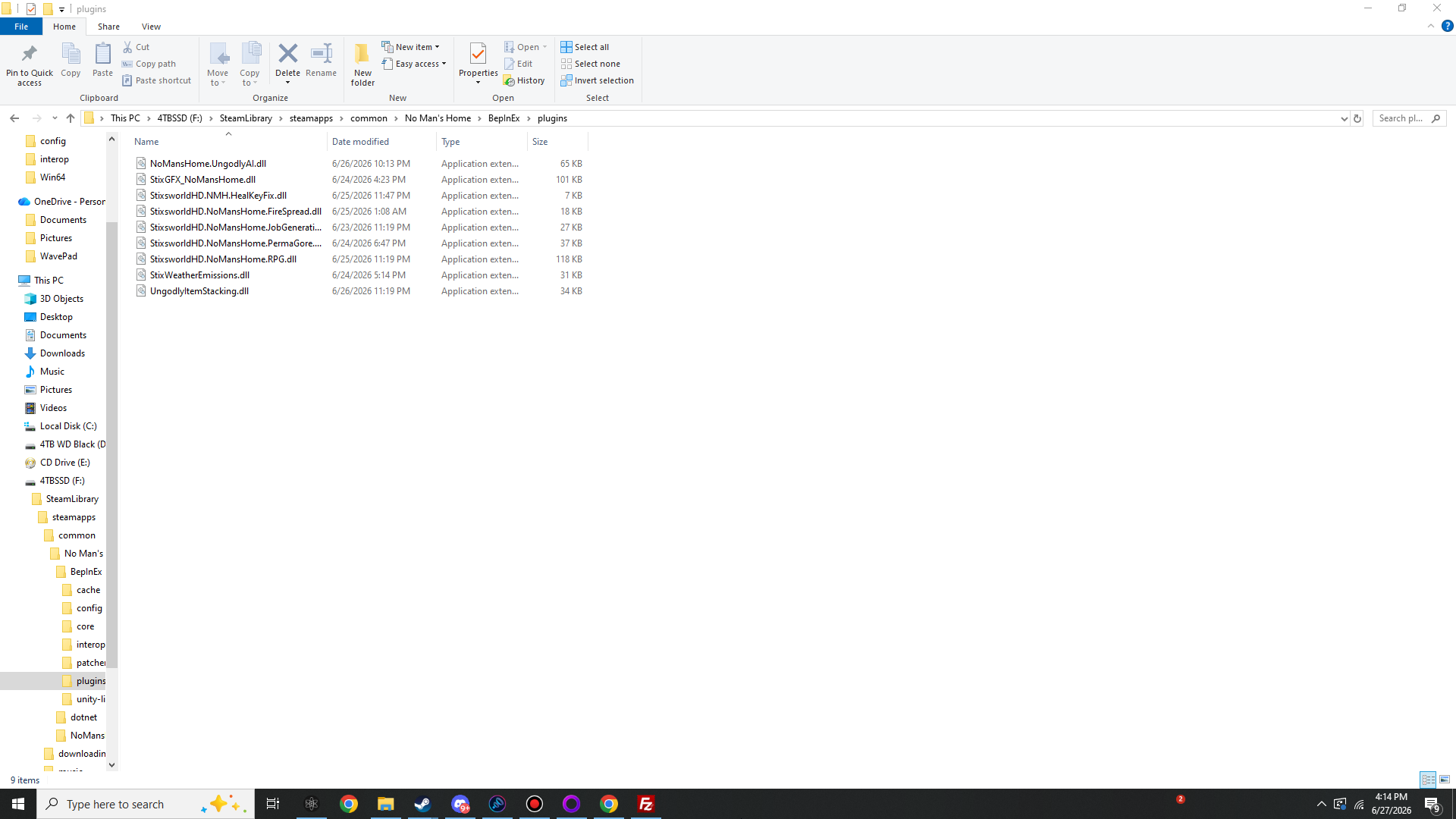
If your plugins\ folder lists these nine DLLs, you're done installing. Launch and check the log banners, or open any mod's page to confirm its specific load line.
Pick a mod for its full card
Each card opens a dedicated page: what it does, its exact DLL, install steps, how to confirm it loaded, config details and how to remove it.
Ungodly Enhanced AI Suite
A single-DLL total overhaul of every AI brain in the Zone — humans, animals, drones and the faction Overwatch.
Ungodly RPG Overhaul
A full, save-persistent RPG character system bolted onto the wasteland — XP, attributes, skills, perks, abilities, crits, combos and prestige.
StixGFX — Graphics & UI Overhaul
A complete URP post-processing stack injected over the game, plus deep camera, ADS, lighting, shadow, fog, quality and HUD control.
Ungodly Enhanced Weather & Emissions
Living volumetric fog, driving rain, vehicle exhaust, real wind, multi-stage lightning and emission blowouts that hit like a punch.
PermaGore — Perma Corpses & Perma Gore
Bodies that never despawn, blood that never fades, and a vastly amplified gore system that erupts on every single hit.
Ungodly Enhanced Fire Spreading
Vanilla fire is polite. This turns it into a living, wind-driven wildfire that branches, throws embers across gaps and cooks off everything it reaches — on a tight performance leash.
Job Generation Overhaul
A bigger, graded, reputation-scaling contract board that reacts to nights, storms, emissions and survival milestones.
Ungodly Item Stacking
Bigger backpacks, everything-stacks, configurable mega-stacks, smart auto-consolidation and a reworked split button — all from one config file.
Heal Key Fix
Kills the bug where the heal / grenade / molotov keys go dead until you restart — quietly, safely, with no config.
Every plugin at a glance
DLL filenames are case-shown as they appear on disk. "Config" means the mod writes a tunable .cfg into BepInEx\config\ on first launch.
| Mod | DLL (in plugins\) | Ver | Category | Size | Config file |
|---|---|---|---|---|---|
| Ungodly Enhanced AI Suite | NoMansHome.UngodlyAI.dll |
1.0.0 | AI & Combat | 65 KB | yes · com.stixsworldhd.nomanshome.ungodlyai.cfg |
| Ungodly RPG Overhaul | StixsworldHD.NoMansHome.RPG.dll |
2.6.0 | Progression | 118 KB | yes · stixsworldhd.nomanshome.rpg.cfg |
| StixGFX — Graphics & UI Overhaul | StixGFX_NoMansHome.dll |
1.0.4 | Visuals | 101 KB | yes · com.stixsworldhd.nomanshome.gfxui.cfg |
| Ungodly Enhanced Weather & Emissions | StixWeatherEmissions.dll |
1.0.2 | Atmosphere | 31 KB | none — drop & play |
| PermaGore — Perma Corpses & Perma Gore | StixsworldHD.NoMansHome.PermaGore.dll |
1.0.0 | Gore | 37 KB | yes · stixsworldhd.nomanshome.permagore.cfg |
| Ungodly Enhanced Fire Spreading | StixsworldHD.NoMansHome.FireSpread.dll |
1.2.0 | Hazard | 18 KB | none — drop & play |
| Job Generation Overhaul | StixsworldHD.NoMansHome.JobGenerationOverhaul.dll |
1.0.0 | Economy | 27 KB | none — drop & play |
| Ungodly Item Stacking | UngodlyItemStacking.dll |
1.0.0 | Inventory | 34 KB | yes · com.stixsworldhd.nomanshome.ungodlyitemstacking.cfg |
| Heal Key Fix | StixsworldHD.NMH.HealKeyFix.dll |
1.0.3 | Stability | 7 KB | none — drop & play |